Matrikon OPC Desktop Historian |
|
|
A flexible, reliable and user-friendly solution for capturing data across your network.
Version 5.4.2
Matrikon OPC Desktop Historian is an affordable solution for time-based data storage. Intended for standalone use or as part of a total enterprise data historian, the tool makes it easy to collect data from OPC Servers at an individual facility, or across an entire geography, and store it on your local Windows desktop. It’s the only product you need to meet a wide range of local data capture requirements.
With OPC Desktop Historian, users can quickly and securely access stored data for analysis, reporting, and informed decision-making. Installation and maintenance are simple, with no need for complex configuration. The historian is stable and reliable with very low latency and high throughput. Data from a server can be seamlessly accessed via an OPC Client and then transferred to the enterprise level when needed.
Features:
- Only historian you need to meet diverse local data capture requirements
- Use as a standalone historian or history buffer in large, distributed architectures
- Best-in-class features such as multi-instance, load balancing and history data transfer
- Simple installation, configuration and deployment
- Low maintenance and support
OPC Desktop Historian is ideal for those who need to archive process data, but don't have the time, resources and money required for implementing an enterprise process historian. Just click-select-collect!
The Matrikon OPC Desktop Historian is:
- A powerful historian for the price of an OPC HDA driver!
- Easily Configurable
- Easy to deploy
- OPC DA and OPC HDA Compliant
- Low Maintenance
Try Matrikon ODH Risk Free:
For those just getting started with data capture and or those looking to archive
fifty items or fewer - Matrikon provides ODH for free, no strings attached. For
those ready to take data capture to the next level - Matrikon offers reasonably
priced packages for every job size.
Licensing (Single instance and Multi instance):
|
OPC Desktop Historian with 50 tags > Single instance only
|
|
FREE
|
|
OPC Desktop Historian with 500 tags support > Single instance only
|
|
OPC Desktop Historian up to 15K tags* > Single instance includes Easy Trender, Excel Reporter & File Collector
|
|
OPC Desktop Historian with > 25K tags** Multi instance includes Easy Trender, Excel Reporter & File Collector
|
|
Store and Forward OPC Desktop Historian up to 15K tags* > Single instance includes Easy Trender, Excel Reporter, File Collector and History Link
|
* Maximum of 15K tags can configured per instance to maintain an update rate of 1 second.
**Maximum of 25K tags can be configured per instance.
| |
| |
USD $12,400.00
Available online today
>>Buy Now
|
|
|
Matrikon OPC Desktop Historian includes:
- Supports input of historical data through the OPC HDA server (insert, replace,and
insert/replace)
- Supports Strings.
- Easy, seamless data archiving. For operations optimization, analysis, reporting,
and much more
- Control over maximum load an OPC client can place on the historian.
- The Backup and Restore tool.
- Rolling Buffer Storage Engine (FF7R) for set and forget storage
- Long Term Storage (FF7) for permanent persistence.
- Tag Lifetime that enables tags that rarely change to be updated and recorded to
disk.
- File Collector that intelligently reads data from files and writes data to an HDA
server with the support of monitoring multiple directories.
Matrikon OPC Desktop Historian is a key component to an overall Hub-and-Spoke solution.
Learn more about OPC Hub and Spoke Solution here
Matrikon OPC Desktop Historian features include (New release 5.4.2):
- Multi-instances of ODH is supported. User can create more than one instance of ODH
Multi-Instance Utility
- Multi-instances of History Link is supported. User can create more than one instance
of History Link Multi-Instance Utility
- ODH can be installed as a stand-alone or Hub and Spoke. User will be able to install
ODH either as a standalone or Hub and Spoke with History Link option
Performance data
- ODH configured with 10K tags – 10K tags/sec gets archived (meets standard performance
criteria)
- ODH configured with 15K tags – 15K tags/sec gets archived (meets standard performance
criteria)
- ODH configured with 20K tags – 20K tags/sec gets archived (No loss of data expected;
Typically, we consider archiving values 1 sample/ sec per tag for a max of 15K tags;
When we raised the tag count > 15K, noticed the delay in archiving of samples)
ODH upgrade from V4.7.0 to V5.4.2
|
ODH Installed Version
|
5.1.x.x or Higher Installer Behavior
|
|
MatrikonOPC Desktop Historian 4.7
|
5.1.x.x or higher version can be installed either as stand-alone or Hub and Spoke
|
|
MatrikonOPC Desktop Historian 4.7 with History Link 4.0.7
|
With History Link 4.0.7 installed, 5.1.x.x or higher version can only be installed
as stand-alone. Once History-Link 4.0.7 is uninstalled, 5.1.x.x or higher version
can be installed either as stand-alone or Hub and Spoke
|
|
MatrikonOPC Desktop Historian 5.0.x.x as stand-alone
|
5.1.x.x or higher version can be installed either as stand-alone to Hub and Spoke
|
|
MatrikonOPC Desktop Historian 5.0.x.x as Hub and Spoke
|
5.1.x.x or higher version can only be installed as Hub and Spoke
|
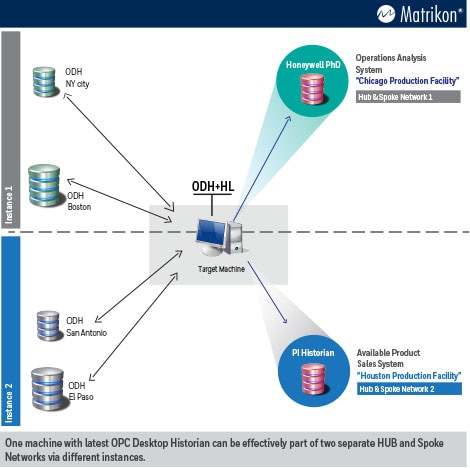
In this diagram, two instances of ODH are running on the Target Machine (located
in the center). By using History Link (HL) the Target Machine is able to independently
service data synchronization between two different Enterprise Historians (Honeywell
PHD and OSI Pi) and their respective remote buffers/historians.
Instance 1 of ODH combined with HL is pulling
data from an ODH in New York City and another ODH located in Boston - pushing the
data into Honeywell PHD (the central or ‘Hub’ Historian). This is diagrammatically
represented as HUB and Spoke network number 1.
Instance 2 of ODH is pulling data from an ODH
in San Antonio and an ODH at El Paso (it can be any number of smaller historian)
and pushing the data into Pi Historian (the central or ‘Hub’ Historian). This is
diagrammatically represented as HUB and Spoke network number 2.
With the support for multi-instance execution, the latest ODH (with a previous configuration)
allows a single PC to service multiple independent HUB and Spoke networks. Without
additional software required this presents a much simpler and economical solution
for data movement.
Quick & Easy to Use:
OPC Desktop Historian installs quickly and easily. It is ideal for those who need
to archive process data but don't have the time, resources and money required to
implement an enterprise process historian. Click-Select-Collect!
In addition to that it is a stand-alone application with visualization tools or
become part of a bigger solution. Its scalability allows it to fit into every process
control environment, large or small.
Included with Matrikon OPC Desktop Historian (Demo Versions):
- Easy OPC Trender: A powerful analysis tool that is easy to use,
yet comprehensive enough for the most sophisticated users.
- Provides user friendly interface from which to trend historical and real-time data.
- Supports multiple trends simultaneously on their own axis.
- Matrikon Analytics Excel Reporter: Using Microsoft Excel for
reporting and analysis, access all real-time and historical data from any OPC server.
- OPC Server for Performance Monitor(Demo Version): This OPC server
gives windows performance information it is typically part of any IT Health monitor
solution. You can measure any process (like an OPC Server) for memory performance,
CPU usage, started or stopped etc.
- Matrikon OPC UA Tunneller™ (Demo Version)
Supported OS:
- Windows 7-32b
- Windows 7-64b
- Windows 10
- Windows 11
- Windows 2008 Server R2 64b
- Windows 2012 Server R2
- Windows 2016 Server R2
- Windows 2019 Server
- Windows 2022 Server
Supported OPC Specifications:
- OPC DA (OPC Data Access) 2.05
- OPC DA (OPC Data Access) 3.0
- OPC HDA (OPC Historical Data Access) 1.2
- OPC Security
|